Aeries Account Registration
If you want to learn more about Aeries before you create your account please
check the topic for What is Aeries?.
How To
Register for Aeries
- Go to the Aeries portal.
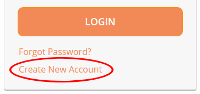
- Click “Create New Account”.
- Select “Parent” and click “Next”.
- Enter the required information and click “Next”.
- (Student ID # and Student Verification Code (VPC) will be entered here.)
- Check your email (possibly in your spam/junk folder) for an email from
portaladmin@hbuhsd.edu.
- Click on the link that says “Confirm Current Email Address”
- Visit the portal and login
with your new account.
- Enter the information requested.
Attach to one or more Students
- Go to the Aeries portal.
- Log in with your existing parent account.
- Select “Change Student” in the upper right corner of the page.
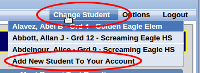
- Select “add new student to your account”
- Enter in the pieces of information requested.
- Click on the word “Home” in the upper left corner.
